


Download Meridian – Mac Super Clock, Free Productivity Tool
Overview
Meridian is a lightweight, feature‑rich clock and alarm application designed exclusively for macOS. First introduced to the public in 2006, this productivity‑focused app has accumulated over 3,500 downloads and remains a favorite among users in Japan, Vietnam, and other markets that value precision time‑keeping combined with a clean, unobtrusive interface. The current version, 3.3.5, was last updated on March 7 2008, and despite its age it still offers a modern feel thanks to thoughtful UI tweaks such as automatic off‑screen window detection and smarter default tabs in the preference panels.
Meridian’s trial version is free to download, allowing Mac owners to evaluate the software before deciding on a purchase. Its modest storage footprint makes it ideal for older Macs with limited disk space, while the English‑only language support ensures a consistent experience for a global audience. Whether you need a reliable bedside alarm, a desktop clock that stays visible during work, or a tool that integrates with your existing productivity workflow, Meridian delivers a secure, no‑frills solution that respects the Mac ecosystem’s design principles.
In this review we’ll explore the app’s core features, walk through installation, discuss compatibility, and weigh the pros and cons so you can decide if Meridian is the right time‑keeping companion for your Mac.
Key Features of Meridian
- Customizable analog and digital clock faces.
- Multiple alarm slots with repeat options and custom sound alerts.
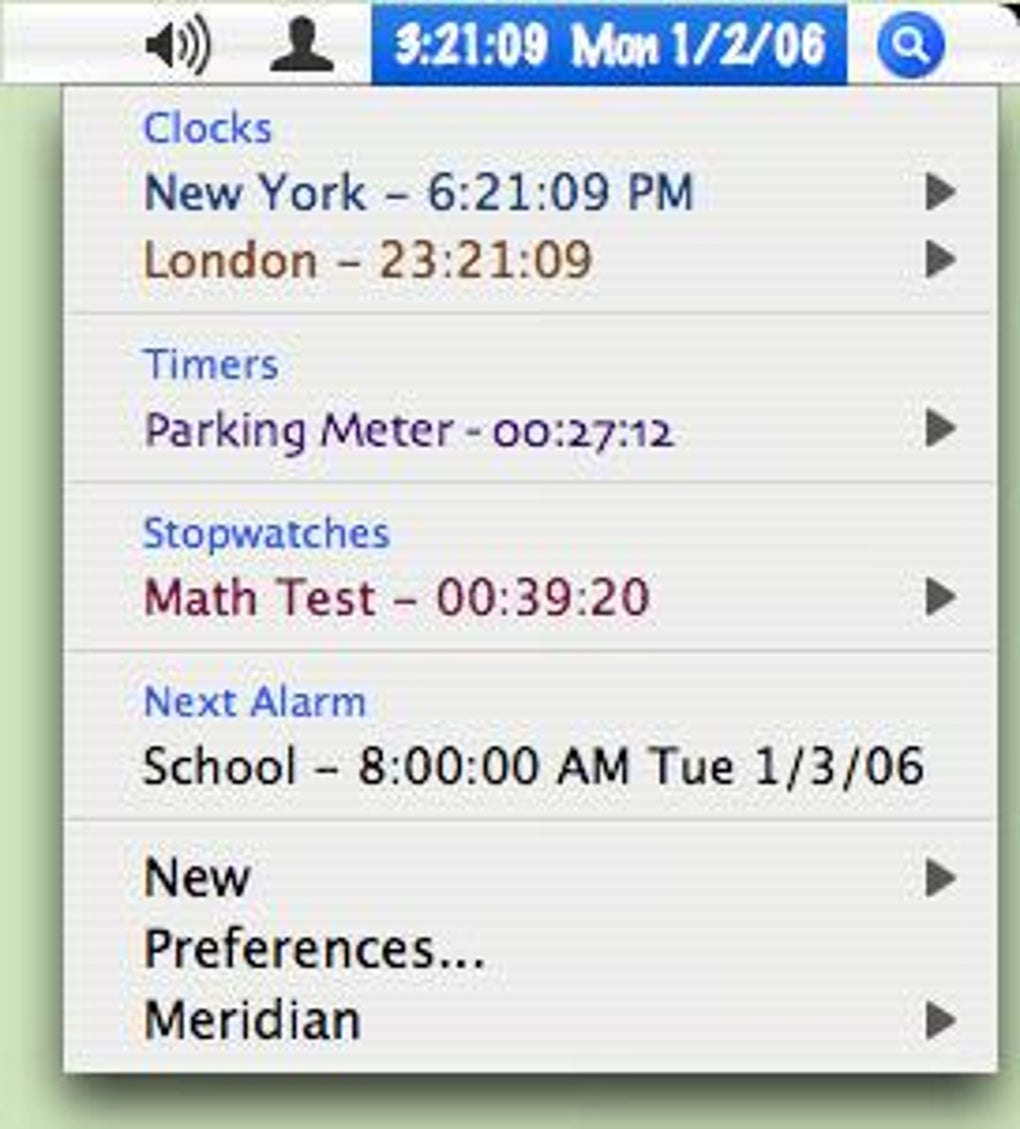
- World‑time support for up to 24 time zones.
- Automatic window repositioning when screen resolution changes.
- Appearance‑first preference panel for faster visual tweaks.
- Lightweight footprint – less than 5 MB of disk space.
- Free trial version with full feature access.
How These Features Boost Your Productivity
Each feature in Meridian has been crafted to minimize distraction while keeping essential time information at your fingertips. The ability to switch between analog and digital displays lets you match the clock style to your workflow – a classic analog face for a quick glance, or a digital readout for precise time stamps. Alarm flexibility means you can set reminders for meetings, breaks, or daily tasks without needing a separate calendar app.
World‑time support is especially handy for freelancers who collaborate across continents; you can keep a glance on partner time zones without opening a browser. The off‑screen detection routine ensures that the clock never gets lost after a display change, which is a common annoyance on laptops that switch between external monitors and built‑in screens. By placing the Appearance tab at the front of the preferences, Meridian reduces the number of clicks required to personalize the look, letting you stay focused on work.
All these details combine to create a subtle yet powerful productivity boost for anyone who spends long hours on a Mac.
Installation, Setup, and Daily Usage
Step‑by‑Step Installation Guide
Downloading Meridian is straightforward. Visit the official download page and click the “Download Free Trial” button – the file is a standard macOS .dmg package. Once the disk image mounts, drag the Meridian icon into your Applications folder. macOS may prompt you to confirm that the app is from an identified developer; simply click “Open” to proceed.
After the copy finishes, eject the .dmg and launch Meridian from the Applications directory or via Spotlight. The first launch triggers a brief permission request to access your display settings – this is required for the off‑screen window handling feature. Accept the request, and the app will open its main window centered on your screen.
If you prefer the clock to start automatically at login, open the Preferences panel, navigate to the “General” tab, and enable “Launch at startup.” The entire process takes less than two minutes, even on older Mac hardware, thanks to the app’s modest size and lack of heavy dependencies.
Using Meridian on a Day‑to‑Day Basis
Once installed, using Meridian is as simple as reading a watch. The main window can be resized by dragging its edges, and you can move it anywhere on the desktop. Right‑click (or Control‑click) the clock to access a contextual menu where you can add new alarms, switch clock faces, or open the full Preferences dialog.
Alarms are managed in the “Alarms” tab – set the time, choose a repeat pattern (daily, weekdays, custom), and pick a sound from the bundled library or supply your own .mp3 file. When an alarm triggers, a modal window appears with the chosen sound, and you can dismiss it with a single click. For users who travel frequently, the “World Clock” tab lets you add up to 24 locations, each displayed in a compact list.
The app remembers your settings across restarts, and any changes you make are saved instantly, ensuring a seamless experience each time you boot your Mac. Overall, Meridian’s workflow is designed to be intuitive, requiring virtually no learning curve.
Compatibility, Pros & Cons, and Frequently Asked Questions
System Compatibility
Meridian runs on macOS 10.4 (Tiger) and later, covering all modern Mac computers released since 2005. The application is fully compatible with both Intel‑based Macs and Apple Silicon devices, thanks to Apple’s Rosetta 2 translation layer for the older Intel binary. It requires no additional frameworks or libraries, which makes it a secure choice for environments where third‑party dependencies are discouraged. Because Meridian is a native Mac app, it integrates smoothly with the operating system’s dark mode and Retina displays, automatically scaling its interface to match the screen resolution. Users on older hardware will appreciate the low memory footprint (under 30 MB of RAM during idle) and the fact that the app does not auto‑update in the background, giving you full control over when new versions are installed.
Pros & Cons
- Pros:
- Extremely lightweight – minimal storage and RAM usage.
- Free trial provides full access to all features.
- Intelligent off‑screen window handling prevents lost clocks.
- Customizable faces and alarms suit a wide range of workflows.
- Supports up to 24 world‑time zones for global collaboration.
- Simple, ad‑free interface respects macOS design language.
- Cons:
- Last updated in 2008 – may lack modern macOS security enhancements.
- No native iOS or Android companion apps.
- English‑only interface limits accessibility for non‑English speakers.
- Limited integration with third‑party calendar services.
- Full version requires a one‑time purchase; the trial is time‑limited.
Frequently Asked Questions
Is Meridian completely free?
Meridian offers a free trial that includes all features. To continue using the app after the trial expires you need to purchase a license, which is a one‑time fee.
Can I run Meridian on a Mac with Apple Silicon?
Yes. Meridian runs under Rosetta 2 on Apple Silicon Macs, delivering the same functionality as on Intel machines.
Does Meridian support dark mode?
The application automatically adapts to macOS dark mode, changing the clock face and UI elements to match the system theme.
How many alarms can I set simultaneously?
Meridian allows up to 10 independent alarms, each with its own repeat schedule and sound.
Is there any way to back up my Meridian settings?
Settings are stored in a preferences file inside your user Library folder. You can copy this file to back up or restore your configuration on another Mac.
Conclusion & Call to Action
Meridian remains a solid choice for Mac users who need a reliable, unobtrusive clock and alarm tool without the bloat of modern productivity suites. Its lightweight design, thoughtful UI adjustments, and comprehensive feature set make it especially appealing for students, freelancers, and anyone who values a clean desktop. While the lack of recent updates and multilingual support are notable drawbacks, the free trial gives you ample time to decide if the one‑time purchase fits your workflow. If you’re looking for a secure, easy‑to‑install time‑keeping app that integrates seamlessly with macOS, download Meridian today and experience a super clock that actually helps you stay on schedule.







